

best solution for your daily whatsapp status needs
WhatsApp has now become an important part of our lives. Every day millions of people use this app. It gained massive popularity as soon as it launched in 2009. The reason is the app's powerful features. It is the only app that not only provided instant messaging but also offered many great features that were not available on other apps at that time. Over time the app has introduced more new features, one feature they launched in 2017 is still the most popular feature today and that feature is “WhatsApp Status”.
On WhatsApp you can set any video, photo, text, link or GIF as your status. This feature allows a posted status to be displayed for 24 hours. You can also see how many people viewed your status, and maybe that's why these days people want to put many videos and photos as status. If you are one of them, today I'd like to tell you about an app where you'll find countless top-notch status videos and photos that you can easily download and post on your WhatsApp to impress people. That amazing app is विडमेट. So let's learn about विडमेट app.
विडमेट ऐप और उसके फ़ीचर्स
विडमेट is one of the best video downloader apps available in the market. On it you can download WhatsApp statuses as well as the latest movies, latest music, and TV shows. Additionally, विडमेट app allows you to download videos from many other video platform websites like YouTube, Facebook, Twitter, Instagram, Dailymotion, Vimeo and more. On विडमेट you can download any video in MP4 and MP3 formats, and the app's video download speed is also the fastest.
विडमेट ऐप कैसे और कहाँ से डाउनलोड करें?
विडमेट ऐप डाउनलोड करने के लिए निचे दिए गए स्टेप्स को फॉलो करें:
- विडमेट की ऑफिशियल वेबसाइट पर जाएं और वेबसाइट पर दिए गए डाउनलोड बटन पर क्लिक करें अथवा निचे मौज़ूद डाउनलोड बटन पर टैप करें।
- VidMate apk डाउनलोड होने के बाद उस पर क्लिक करें और ऐप को इंस्टॉल करें।
- Since this is a third-party app, your phone will ask for some necessary permissions when installing it. Grant all required permissions so the app can install successfully.
विडमेट ऐप पर व्हाट्सएप स्टेटस वीडियो और इमेज़ कैसे डाउनलोड करें?
> After installing the app, open it; you will find two separate sections: Status and Images.

> Tap the Status or Images section; you will see videos and images displayed like this.


> Tap the status video you want to download and click the red download button below it.
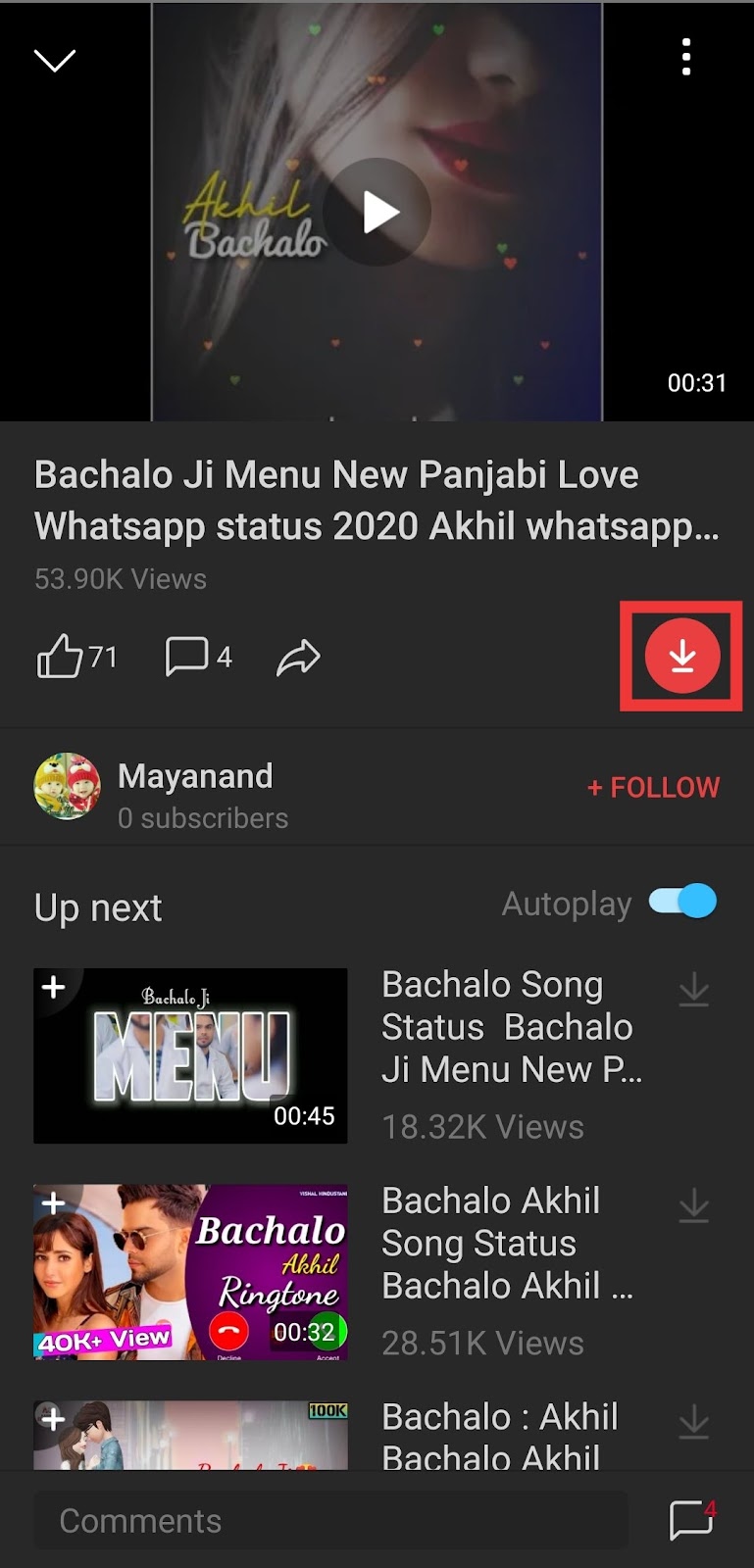
> Now you'll get options to download the video in two formats: Music (MP3) and Video. Choose the format and quality you want and tap the download button.

With these easy steps you can download as many WhatsApp statuses as you want. So install the विडमेट app on your Android phone and give it a try.

